

Find it in Darwin Daily work → Overview Open this screen ↗
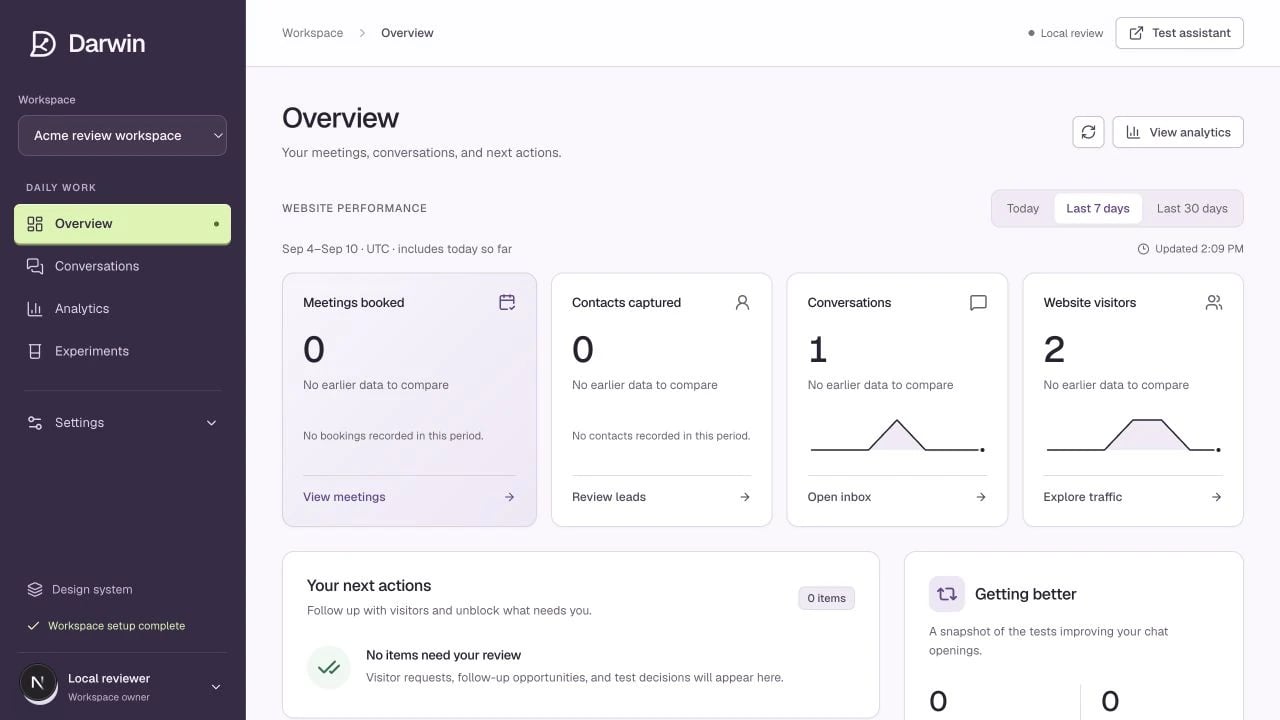
Overview starts with meetings, contacts, conversations, and website visitors.
Screenshots use a demonstration workspace. Your data, plan, and activation status may differ.
Choose Today, Last 7 days, or Last 30 days. The period label uses UTC and includes today so far.Start with the outcome
The top cards show Meetings booked, Contacts captured, Conversations, and Website visitors. Each links to the relevant detail. A missing comparison means there is no useful earlier data; it is not a zero-percent change.Follow the next action
Your next actions highlights visitor requests, follow-up opportunities, and test decisions that need attention. Conversation highlights takes you to the transcripts behind results. Getting better summarizes active tests, winners applied, and traffic covered by a test or winning opening. It also shows whether automatic checks are actually connected. Use Refresh overview for a current snapshot. For deeper comparisons, open View analytics.Performance reports count recorded visitor sessions for events. Inbox links open current conversation lists, which may use different filters or periods. A headline count is not a substitute for an invoice or verified usage ledger.