

Find it in Darwin Settings → Chat openings Open this screen ↗
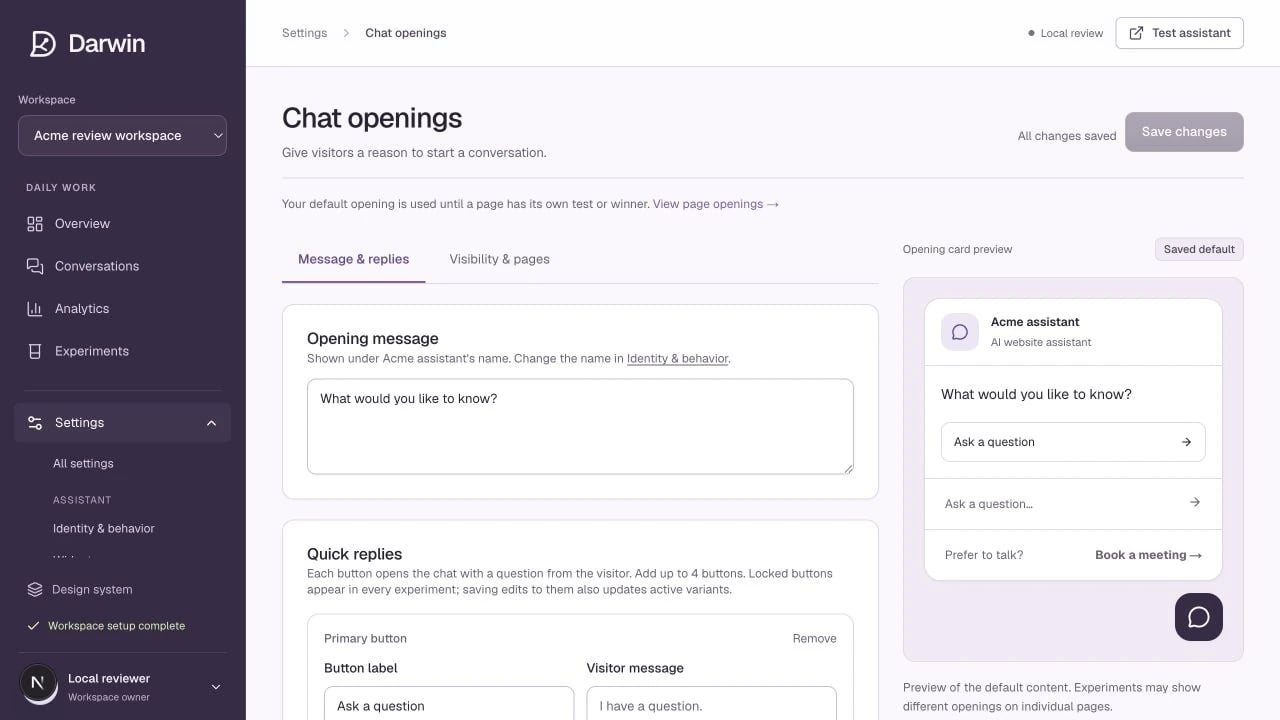
Chat openings shows the default message alongside a visitor-facing preview.
Screenshots use a demonstration workspace. Your data, plan, and activation status may differ.
The opening is the small message beside the launcher before a visitor starts a chat. It is the copy Darwin experiments with. Your default is used until a page has its own running test or winning opening.Message & replies
Write a short opening that gives a visitor a reason to engage. “Need help finding the right plan?” offers more context than “Any questions?” For each reply button, set the label the visitor sees and the message sent when they click it. Use Lock this button for a reply that must remain consistent across variants. You can also show a question input so visitors can type directly into the opening card. The Meeting link area adds a persistent booking offer. Its lead-in is optional; leaving the link text empty hides it. The calendar destination lives in Scheduling.Visibility & pages
Turn Show the opening card on or off and set the desktop delay. On mobile, the card waits at least six seconds and until the visitor scrolls 40% down the page. A dismissed opening stays hidden for the rest of that session. Add page exclusions using an exact path, or a path ending in/* to cover a section. Check the preview and save your changes. Hiding the opening card is different from uninstalling the entire widget.
If tests are already running
Saving the default does not silently replace the copy in every active test. Darwin offers three choices:
Use Experiments → Pages to see what is actually showing on a particular page.