

Find it in Darwin Conversations → the request panel Open this screen ↗
A request a visitor sends through one of your forms counts the same way as a booked meeting. It uses one of your plan’s included bookings first, then your plan’s per-booking rate. See Plans and usage for the numbers.
What isn’t billed
A request isn’t billed when:- it was sent from the Agent Studio preview,
- the visitor wasn’t a fit, by your fit rules,
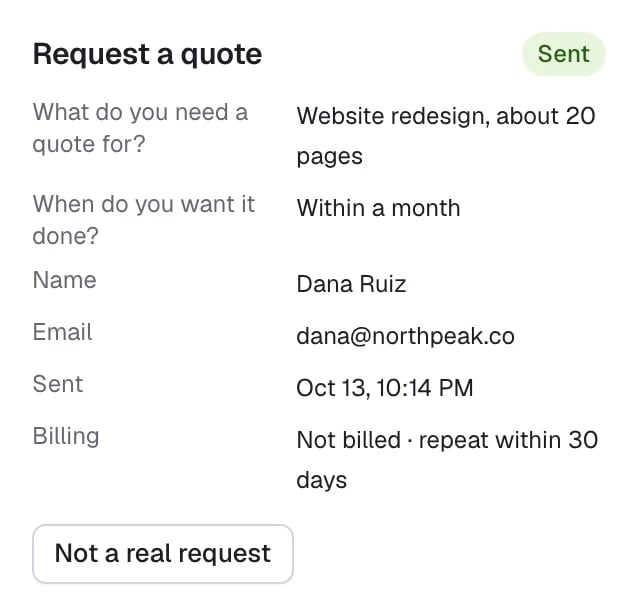
- the same email sent the same form in the last 30 days, and that one counted, or
- the conversation already counted once, for a meeting or another request.
- If the meeting is booked while the request is still in its three-day hold, the meeting counts instead, and the request shows Not billed · the meeting counts instead.
- If the meeting comes later, the meeting isn’t charged again.
The three-day hold
A billed request counts three days after it’s sent. Until then, its panel in Conversations shows the date it counts, for example Included · counts Oct 16 or Billed · counts Oct 16. To take a request off your bill during the hold:- Open the conversation from Meetings → Requests (Conversation) or from Conversations.
- In the request panel on the right, select Not a real request.
Billing states
In Meetings → Requests, the Billing column shortens these to Counted, Not billed or Removed.
Where requests show on your bill
Billing counts meetings and requests together: how many were booked or sent this period, how many are billable, and the plan’s included meetings or requests. See Manage billing.Good to know
- Fit rules decide what’s billed: a visitor who isn’t a fit is never charged, and still reaches you with their answers.
- A form that asks for a meeting at the end counts once, whether the visitor books or only sends the request.
Plans and usage
Included bookings and the rate on each plan.
Requests and follow-up
Find requests and send them to your CRM.