

Find it in Darwin Meetings Open this screen ↗
Every meeting a visitor books in the chat lands here once your scheduling provider confirms it.

Meetings: the views and search on top, your booked meetings below.
1
Pick a view
Choose Upcoming, Past or Canceled (1). Each shows how many meetings it holds. Upcoming lists the soonest first; Past and Canceled list the most recent first. Type in Search meetings (2) to find a meeting by name, email, meeting type or host.
2
Open the conversation
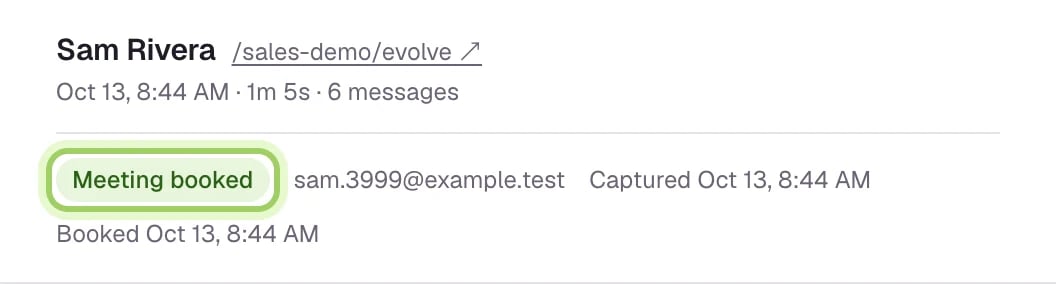
Select Conversation at the end of a row to read the chat the meeting came from. You can also open Conversations and choose the Meetings booked tab. A booked conversation shows Meeting booked at the top, with the visitor’s email and when they booked.
3
Refresh or change your calendar
The list updates by itself every 30 seconds; select Refresh (2) to check now. Calendar settings (1) opens Integrations, where you choose how meetings get booked.
What each meeting shows
- When: the date and time, in your browser’s time zone.
- With: the visitor’s name and email.
- Meeting: the meeting type, the host and the provider.
- Status: Confirmed, Pending or Canceled, and how many times it was rescheduled.
- Usage: whether the meeting is Included in your plan, what it costs, or Not billed.
- Conversation: a link to the chat the meeting came from.
Good to know
- A booking shows as pending while Darwin confirms it with your calendar. Pending bookings don’t count toward usage until they’re confirmed.
- With RevenueHero, bookings reported by the chat wait under Awaiting verification until RevenueHero’s webhook confirms them. They aren’t counted until then.
- Bookings made in the Agent Studio preview are tests and never appear here.
- Search looks through every meeting in the tab you’re on, not just the page on screen.
How meetings get booked
Connect Calendly, Google Calendar or RevenueHero.
A booking is missing
What to check when a meeting doesn’t show up.