> ## Documentation Index
> Fetch the complete documentation index at: https://docs.meetdarwin.ai/llms.txt
> Use this file to discover all available pages before exploring further.
# Requests and follow-up
> Find what visitors sent through your outcome forms in Meetings → Requests and Conversations, get each request by email, and send requests to your CRM with Zapier, the outcome.submitted webhook or the API.
Every request a visitor sends through one of your forms is saved with its conversation, and it goes out by email and to any tool you connect. Answers to Book a meeting's questions are saved the same way.
## See every request
Open **Meetings** and select **Requests** at the top.
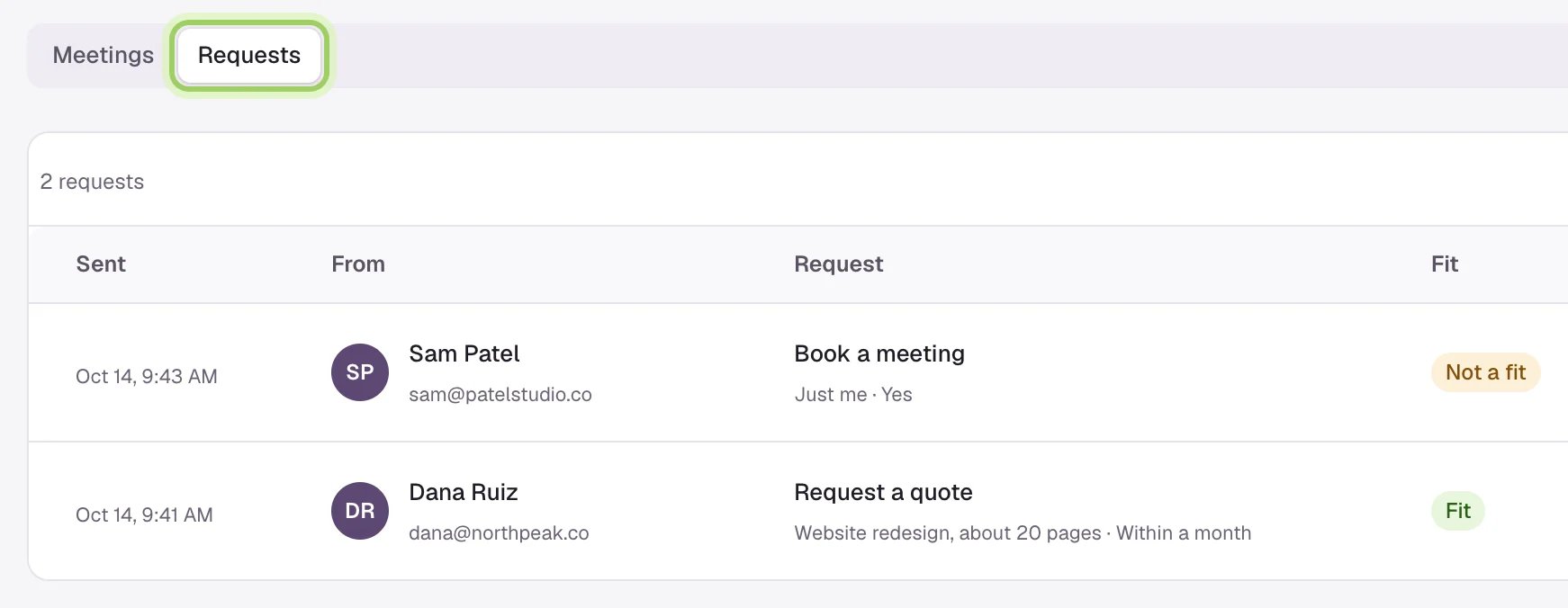 Each row shows:
* **Sent**: when the visitor sent it.
* **From**: their name, email and phone, if they gave one.
* **Request**: the form's name and the first two answers.
* **Fit**: **Fit**, or **Not a fit** when an answer ruled them out.
* **Billing**: **Counted**, **Not billed** or **Removed**. See [How requests are billed](/outcomes/billing).
* **Conversation** opens the chat the request came from.
**Search requests** looks through names, emails and answers. **Outcomes**, at the top of the page, opens Agent Studio → Outcomes.
## Read a request beside its conversation
In **Conversations**, a conversation with a request shows the form's name as a badge in the list, and "Request a quote sent", for example, at the top. The panel on the right has the request:
* each question and its answer
* the visitor's name, email and phone
* **Fit**, with the question that ruled them out
* when it was sent, and its billing state
Each row shows:
* **Sent**: when the visitor sent it.
* **From**: their name, email and phone, if they gave one.
* **Request**: the form's name and the first two answers.
* **Fit**: **Fit**, or **Not a fit** when an answer ruled them out.
* **Billing**: **Counted**, **Not billed** or **Removed**. See [How requests are billed](/outcomes/billing).
* **Conversation** opens the chat the request came from.
**Search requests** looks through names, emails and answers. **Outcomes**, at the top of the page, opens Agent Studio → Outcomes.
## Read a request beside its conversation
In **Conversations**, a conversation with a request shows the form's name as a badge in the list, and "Request a quote sent", for example, at the top. The panel on the right has the request:
* each question and its answer
* the visitor's name, email and phone
* **Fit**, with the question that ruled them out
* when it was sent, and its billing state
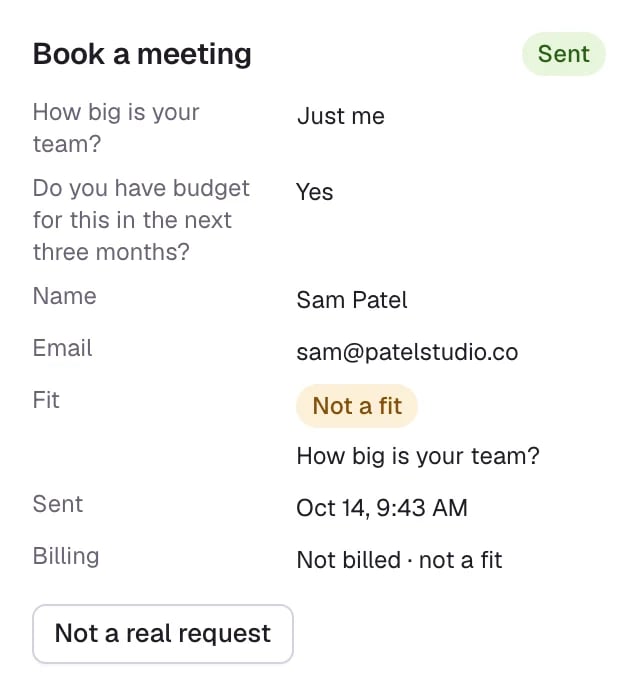 If the request isn't real, such as spam or a colleague trying the form, select **Not a real request**. It stays in the conversation, marked **Removed from your bill**. On a request that's billed, the button is there until the request counts, three days after it's sent.
A form the visitor opened but didn't send shows as **Not sent**, with when it was opened.
## Get each request by email
Darwin emails each request, with every answer and whether the visitor was a fit:
* **Your team**: everyone with **Bookings and requests** turned on in [Notifications](/account/notifications). It's on to start.
* **Extra addresses**: up to five per form, such as sales@ or a shared inbox. Add them under **Send answers to → Email** on the form. See [Build an outcome](/outcomes/build).
## Send requests to other tools
| Where | What you get | Set it up |
| - | - | - |
| **Zapier** | The **New Outcome Request** trigger, with each answer as its own field, ready for HubSpot, Salesforce, a sheet or Slack | [Connect Zapier](/integrations/zapier) |
| **Webhook** | The `outcome.submitted` event, signed, with every answer, the contact, fit and the conversation | [Webhooks](/api-reference/webhooks) |
| **API** | `GET /v1/outcomes` lists your forms and their answer keys; `GET /v1/outcome_requests` lists requests, filtered by form, fit, conversation or date | The **Outcomes** endpoints in the API tab, with the `meetings:read` scope. Names, emails and phone numbers also need `contacts:read`. See [Scopes](/api-reference/authentication#scopes). |
| **AI assistants** | `list_outcome_requests`, for an assistant connected to Darwin | [MCP server](/api-reference/mcp) |
Darwin doesn't add requests to a CRM on its own. Use Zapier or a webhook for that.
## Good to know
* Removing a form doesn't remove its requests. They stay here and in Conversations.
* Requests sent from the Agent Studio preview aren't listed in Meetings → Requests.
* A privacy erase for a visitor clears their requests' answers and contact details too. See [Privacy](/api-reference/privacy).
What counts, what doesn't, and how to take a request off your bill.
Send each request's answers to your CRM or a sheet.
This documentation is built and hosted on [Mintlify](https://mintlify.com), a developer documentation platform.
If the request isn't real, such as spam or a colleague trying the form, select **Not a real request**. It stays in the conversation, marked **Removed from your bill**. On a request that's billed, the button is there until the request counts, three days after it's sent.
A form the visitor opened but didn't send shows as **Not sent**, with when it was opened.
## Get each request by email
Darwin emails each request, with every answer and whether the visitor was a fit:
* **Your team**: everyone with **Bookings and requests** turned on in [Notifications](/account/notifications). It's on to start.
* **Extra addresses**: up to five per form, such as sales@ or a shared inbox. Add them under **Send answers to → Email** on the form. See [Build an outcome](/outcomes/build).
## Send requests to other tools
| Where | What you get | Set it up |
| - | - | - |
| **Zapier** | The **New Outcome Request** trigger, with each answer as its own field, ready for HubSpot, Salesforce, a sheet or Slack | [Connect Zapier](/integrations/zapier) |
| **Webhook** | The `outcome.submitted` event, signed, with every answer, the contact, fit and the conversation | [Webhooks](/api-reference/webhooks) |
| **API** | `GET /v1/outcomes` lists your forms and their answer keys; `GET /v1/outcome_requests` lists requests, filtered by form, fit, conversation or date | The **Outcomes** endpoints in the API tab, with the `meetings:read` scope. Names, emails and phone numbers also need `contacts:read`. See [Scopes](/api-reference/authentication#scopes). |
| **AI assistants** | `list_outcome_requests`, for an assistant connected to Darwin | [MCP server](/api-reference/mcp) |
Darwin doesn't add requests to a CRM on its own. Use Zapier or a webhook for that.
## Good to know
* Removing a form doesn't remove its requests. They stay here and in Conversations.
* Requests sent from the Agent Studio preview aren't listed in Meetings → Requests.
* A privacy erase for a visitor clears their requests' answers and contact details too. See [Privacy](/api-reference/privacy).
What counts, what doesn't, and how to take a request off your bill.
Send each request's answers to your CRM or a sheet.
This documentation is built and hosted on [Mintlify](https://mintlify.com), a developer documentation platform.