> ## Documentation Index
> Fetch the complete documentation index at: https://docs.meetdarwin.ai/llms.txt
> Use this file to discover all available pages before exploring further.
# How requests are billed
> A request sent through an outcome form counts like a booked meeting. What isn't billed (preview chats, visitors who aren't a fit, repeats, a second charge in one conversation), the three-day hold, and Not a real request.
A request a visitor sends through one of your forms counts the same way as a booked meeting. It uses one of your plan's included bookings first, then your plan's per-booking rate. See [Plans and usage](/account/plans) for the numbers.
## What isn't billed
A request isn't billed when:
* it was sent from the Agent Studio preview,
* the visitor wasn't a fit, by your fit rules,
* the same email sent the same form in the last 30 days, and that one counted, or
* the conversation already counted once, for a meeting or another request.
**One conversation is charged once.** A quote request that turns into a booked meeting in the same chat is one sale:
* If the meeting is booked while the request is still in its three-day hold, the meeting counts instead, and the request shows **Not billed · the meeting counts instead**.
* If the meeting comes later, the meeting isn't charged again.
## The three-day hold
A billed request counts three days after it's sent. Until then, its panel in Conversations shows the date it counts, for example **Included · counts Oct 16** or **Billed · counts Oct 16**.
To take a request off your bill during the hold:
1. Open the conversation from **Meetings → Requests** (**Conversation**) or from **Conversations**.
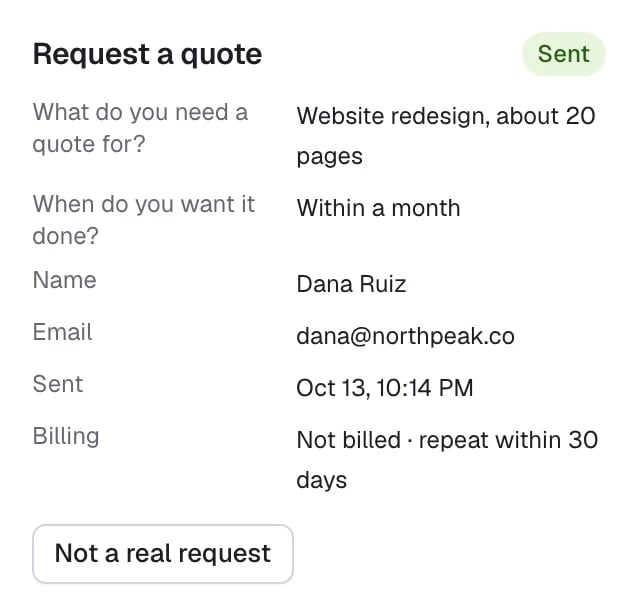
2. In the request panel on the right, select **Not a real request**.
The request stays in the conversation, marked **Removed from your bill**, and an included booking it used is given back. After three days the request has counted and the button is gone.
## Billing states
| In the request panel | What it means |
| - | - |
| **Included · counts Oct 16**, **Billed · counts Oct 16** | In the hold. You can still remove it. |
| **Included in your plan** | Counted, using an included booking |
| **Billed** | Counted, at your plan's rate |
| **Not billed · preview** | Sent from the Agent Studio preview |
| **Not billed · not a fit** | The visitor didn't fit your rules |
| **Not billed · repeat within 30 days** | The same email sent this form in the last 30 days |
| **Not billed · already counted in this conversation** | A meeting or another request in the chat counted |
| **Not billed · the meeting counts instead** | A meeting booked in the same chat replaced it |
| **Removed from your bill** | Someone selected **Not a real request** |
In **Meetings → Requests**, the **Billing** column shortens these to **Counted**, **Not billed** or **Removed**.
 ## Where requests show on your bill
**Billing** counts meetings and requests together: how many were booked or sent this period, how many are billable, and the plan's included meetings or requests. See [Manage billing](/account/manage-billing).
## Good to know
* Fit rules decide what's billed: a visitor who isn't a fit is never charged, and still reaches you with their answers.
* A form that asks for a meeting at the end counts once, whether the visitor books or only sends the request.
Included bookings and the rate on each plan.
Find requests and send them to your CRM.
This documentation is built and hosted on [Mintlify](https://mintlify.com), a developer documentation platform.
## Where requests show on your bill
**Billing** counts meetings and requests together: how many were booked or sent this period, how many are billable, and the plan's included meetings or requests. See [Manage billing](/account/manage-billing).
## Good to know
* Fit rules decide what's billed: a visitor who isn't a fit is never charged, and still reaches you with their answers.
* A form that asks for a meeting at the end counts once, whether the visitor books or only sends the request.
Included bookings and the rate on each plan.
Find requests and send them to your CRM.
This documentation is built and hosted on [Mintlify](https://mintlify.com), a developer documentation platform.