> ## Documentation Index
> Fetch the complete documentation index at: https://docs.meetdarwin.ai/llms.txt
> Use this file to discover all available pages before exploring further.
# Outcomes: forms your agent opens in the chat
> What an outcome is in Darwin: a short form, like Request a quote or Request a callback, that your agent opens in the chat. Book a meeting is the built-in one. Answers come to you, and a sent request counts like a booked meeting.
An outcome is something a visitor can get done in your chat. Most are short forms: a quote request, a callback, or a few questions before a call. When a visitor wants one, your agent opens the form right in the chat, the visitor answers one question at a time, and their answers come to you.
**Book a meeting** is the outcome every agent starts with. You can give it questions of its own, so visitors answer them before they see the calendar.
 ## What you can build
| Outcome | What the visitor gives you | What happens next |
| - | - | - |
| **Request a quote** | What they need, when, any details, then their email | Your thank-you message, such as "We'll send your quote within one business day." |
| **Request a callback** | The topic, a good time to call, and a phone number | Your thank-you message |
| **Your own form** | Up to seven questions of your own | A message, or a meeting booked straight after the form |
| **Book a meeting** (built in) | Your qualifying questions, if you add any | The calendar for visitors who fit; your message for those who don't |
## What a visitor sees
1. The visitor asks for what the form is for, or taps its button: at the top of the chat, or on your own website.
2. The agent says a line and opens the form in the chat. If the visitor already answered a question in the chat, the agent can fill it in for them.
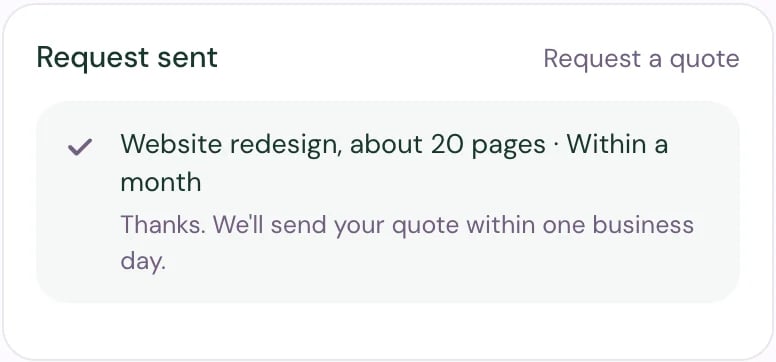
3. They answer one question at a time, then give their name and email last and select **Send request**.
4. They see your thank-you message, or go on to pick a time.
## What you can build
| Outcome | What the visitor gives you | What happens next |
| - | - | - |
| **Request a quote** | What they need, when, any details, then their email | Your thank-you message, such as "We'll send your quote within one business day." |
| **Request a callback** | The topic, a good time to call, and a phone number | Your thank-you message |
| **Your own form** | Up to seven questions of your own | A message, or a meeting booked straight after the form |
| **Book a meeting** (built in) | Your qualifying questions, if you add any | The calendar for visitors who fit; your message for those who don't |
## What a visitor sees
1. The visitor asks for what the form is for, or taps its button: at the top of the chat, or on your own website.
2. The agent says a line and opens the form in the chat. If the visitor already answered a question in the chat, the agent can fill it in for them.
3. They answer one question at a time, then give their name and email last and select **Send request**.
4. They see your thank-you message, or go on to pick a time.
 See [Outcomes in the chat](/outcomes/in-the-chat) for every way a form opens.
## How it works with booking
Book a meeting and your forms work together:
* **Questions before any meeting.** Add questions to Book a meeting, and every meeting request asks them first. Visitors who aren't a fit see your message instead of the calendar.
* **A form that ends in a meeting.** A form such as "Plan a site visit" can go straight on to booking once it's sent.
* **One charge per conversation.** If a visitor sends a request and books a meeting in the same chat, you're charged once.
## What it costs
A sent request counts like a booked meeting: it uses one of your included bookings, then your plan's rate. Requests from visitors who aren't a fit, repeats and Agent Studio preview chats aren't billed, and you have three days to take a request off your bill. See [How requests are billed](/outcomes/billing).
## Build your first one
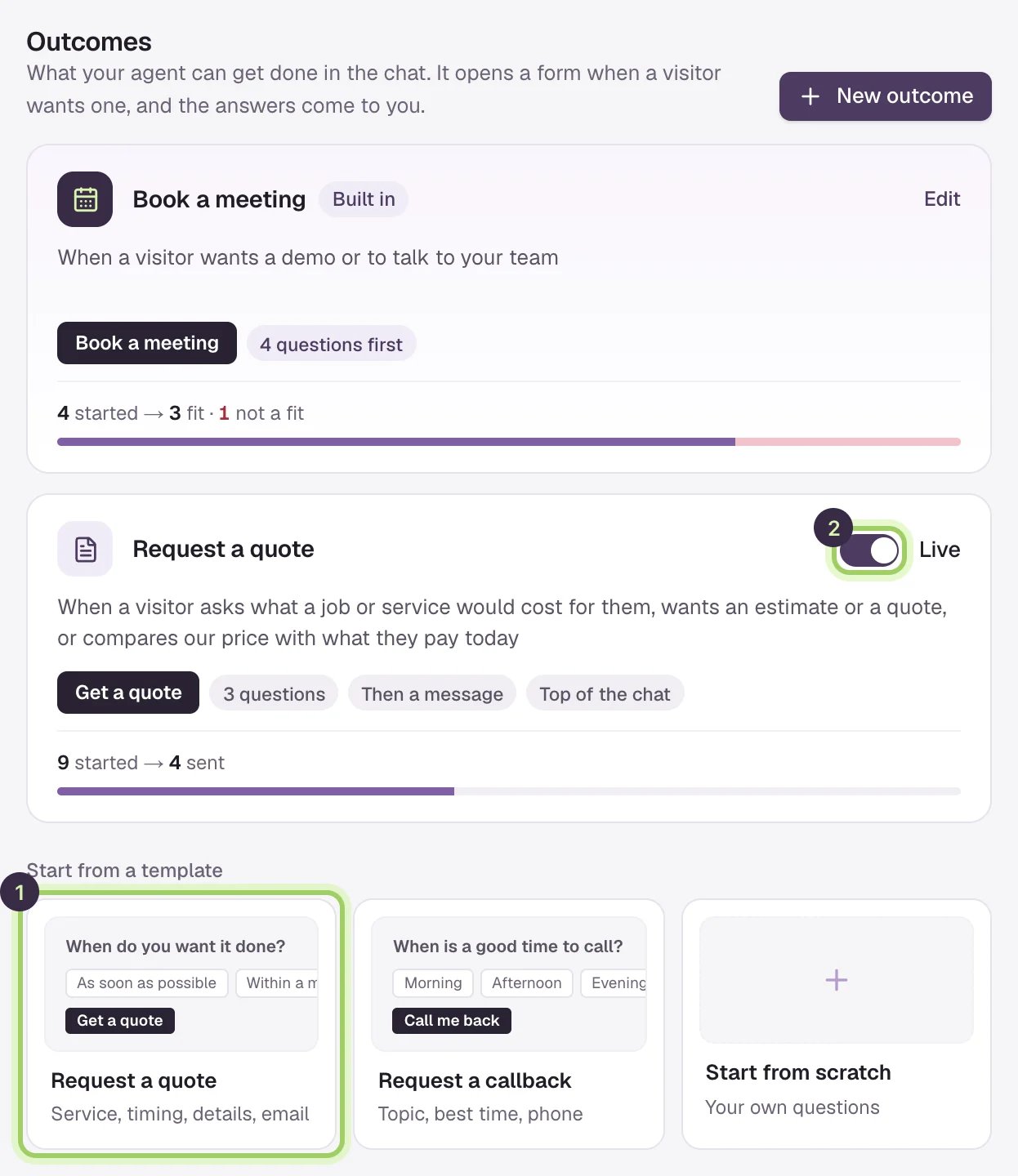
1. Open **Agent Studio → Outcomes** and pick **Request a quote** under **Start from a template**.
2. Change the questions to fit your business. See [Build an outcome](/outcomes/build).
3. Turn on the switch to make it **Live**, then select **Save changes**.
4. Ask for a quote in the Agent Studio preview to try it.
5. Watch for requests in **Meetings → Requests**. See [Requests and follow-up](/outcomes/requests).
## Good to know
* A workspace can have Book a meeting and up to nine forms.
* The agent opens one form at a time, and never asks a form's questions in plain messages.
* A form that's off is saved but never offered to visitors.
Pick a template, write the questions and choose what happens after.
How visitors open a form, and how booking questions work.
This documentation is built and hosted on [Mintlify](https://mintlify.com), a developer documentation platform.
See [Outcomes in the chat](/outcomes/in-the-chat) for every way a form opens.
## How it works with booking
Book a meeting and your forms work together:
* **Questions before any meeting.** Add questions to Book a meeting, and every meeting request asks them first. Visitors who aren't a fit see your message instead of the calendar.
* **A form that ends in a meeting.** A form such as "Plan a site visit" can go straight on to booking once it's sent.
* **One charge per conversation.** If a visitor sends a request and books a meeting in the same chat, you're charged once.
## What it costs
A sent request counts like a booked meeting: it uses one of your included bookings, then your plan's rate. Requests from visitors who aren't a fit, repeats and Agent Studio preview chats aren't billed, and you have three days to take a request off your bill. See [How requests are billed](/outcomes/billing).
## Build your first one
1. Open **Agent Studio → Outcomes** and pick **Request a quote** under **Start from a template**.
2. Change the questions to fit your business. See [Build an outcome](/outcomes/build).
3. Turn on the switch to make it **Live**, then select **Save changes**.
4. Ask for a quote in the Agent Studio preview to try it.
5. Watch for requests in **Meetings → Requests**. See [Requests and follow-up](/outcomes/requests).
## Good to know
* A workspace can have Book a meeting and up to nine forms.
* The agent opens one form at a time, and never asks a form's questions in plain messages.
* A form that's off is saved but never offered to visitors.
Pick a template, write the questions and choose what happens after.
How visitors open a form, and how booking questions work.
This documentation is built and hosted on [Mintlify](https://mintlify.com), a developer documentation platform.