> ## Documentation Index
> Fetch the complete documentation index at: https://docs.meetdarwin.ai/llms.txt
> Use this file to discover all available pages before exploring further.
# Personal link settings and privacy
> Link Studio → Settings: turn personal link greetings and team emails on or off, and what Darwin stores, removes from the address and keeps in the darwin_vid cookie when someone opens a personal link.
Choose what happens when someone opens a personal link, and see what Darwin keeps about them.
## Choose what happens when someone clicks
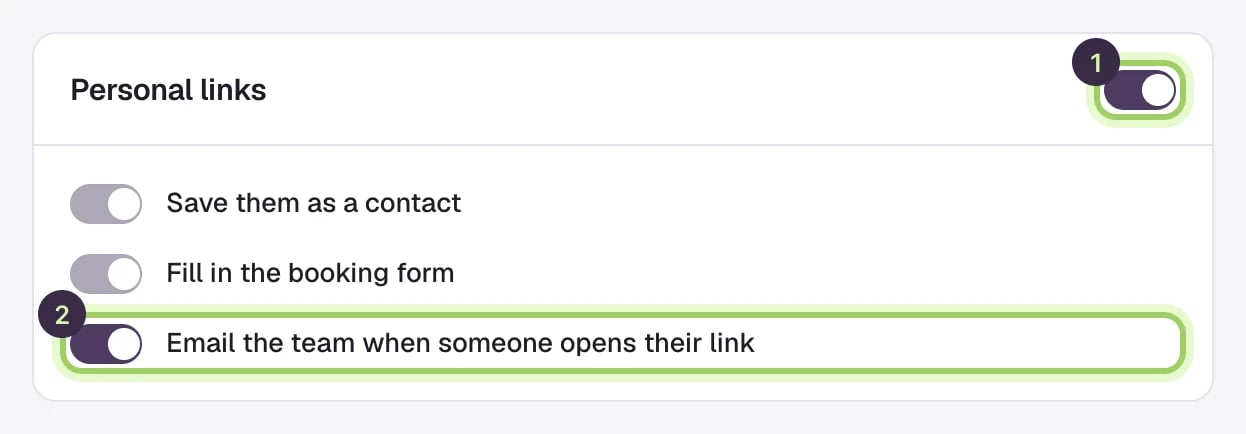
On the **Settings** tab, under **Personal links**:
* **Greet people from personal links** (1) turns every greeting on or off. Off, links still open your page, which shows its usual opening message, and Darwin records no visit and sends no email.
* **Save them as a contact** and **Fill in the booking form** are always on.
* **Email the team when someone opens their link** (2) sends the team email described in [Results and follow-up](/link-studio/results). Turn it off to stop it for everyone.
Select **Save changes** after switching.
 ## What Darwin stores
For each visit from a personal link, Darwin keeps the link and the greeting shown, the page it opened, the details the link carried (email, first and last name, company and job title) and when it happened. Opening the same link again in the same browser within 12 hours counts as the same visit.
If the link carries an email address, Darwin saves the person as a contact, or updates the one you have, like a form submission. When you [erase a person](/api-reference/privacy) by email, their link visits are erased too, and an export includes them.
## What Darwin removes from the address
As soon as the chat loads, Darwin takes the link's own parameters (`dw`, `dw_email`, `dw_first`, `dw_last`, `dw_company`, `dw_title`) out of the address bar, so they don't stay in the visitor's history or travel on to other sites. UTM tags, `gclid`, your other parameters and `#anchors` stay as they were, so your analytics and forms keep their campaign tracking.
## The `darwin_vid` cookie
The chat keeps a first-party cookie, `darwin_vid`, on your own domain. It holds the same visitor ID the chat already keeps in the browser, so `www.example.com` and `example.com` count as one visitor.
## Good to know
* If your email tool couldn't fill in a detail and the link arrives with something like `{{firstName}}`, Darwin ignores it and uses your fallback words.
* A draft link greets no one and records no visit.
* If someone opens a link you've since deleted, the chat greets them with the first greeting on your **Greetings** tab. With no greetings, they see your page's usual opening message.
What personal links do, end to end.
Where the chat shows, and your privacy notice.
This documentation is built and hosted on [Mintlify](https://mintlify.com), a developer documentation platform.
## What Darwin stores
For each visit from a personal link, Darwin keeps the link and the greeting shown, the page it opened, the details the link carried (email, first and last name, company and job title) and when it happened. Opening the same link again in the same browser within 12 hours counts as the same visit.
If the link carries an email address, Darwin saves the person as a contact, or updates the one you have, like a form submission. When you [erase a person](/api-reference/privacy) by email, their link visits are erased too, and an export includes them.
## What Darwin removes from the address
As soon as the chat loads, Darwin takes the link's own parameters (`dw`, `dw_email`, `dw_first`, `dw_last`, `dw_company`, `dw_title`) out of the address bar, so they don't stay in the visitor's history or travel on to other sites. UTM tags, `gclid`, your other parameters and `#anchors` stay as they were, so your analytics and forms keep their campaign tracking.
## The `darwin_vid` cookie
The chat keeps a first-party cookie, `darwin_vid`, on your own domain. It holds the same visitor ID the chat already keeps in the browser, so `www.example.com` and `example.com` count as one visitor.
## Good to know
* If your email tool couldn't fill in a detail and the link arrives with something like `{{firstName}}`, Darwin ignores it and uses your fallback words.
* A draft link greets no one and records no visit.
* If someone opens a link you've since deleted, the chat greets them with the first greeting on your **Greetings** tab. With no greetings, they see your page's usual opening message.
What personal links do, end to end.
Where the chat shows, and your privacy notice.
This documentation is built and hosted on [Mintlify](https://mintlify.com), a developer documentation platform.