> ## Documentation Index
> Fetch the complete documentation index at: https://docs.meetdarwin.ai/llms.txt
> Use this file to discover all available pages before exploring further.
# Greet prospects by name with personal links
> Link Studio: make personal links for your outbound emails. When someone clicks one, Darwin's chat on your website greets them by name with your reply buttons, the agent knows who they are and why you reached out, and each link shows its visits, chats and meetings.
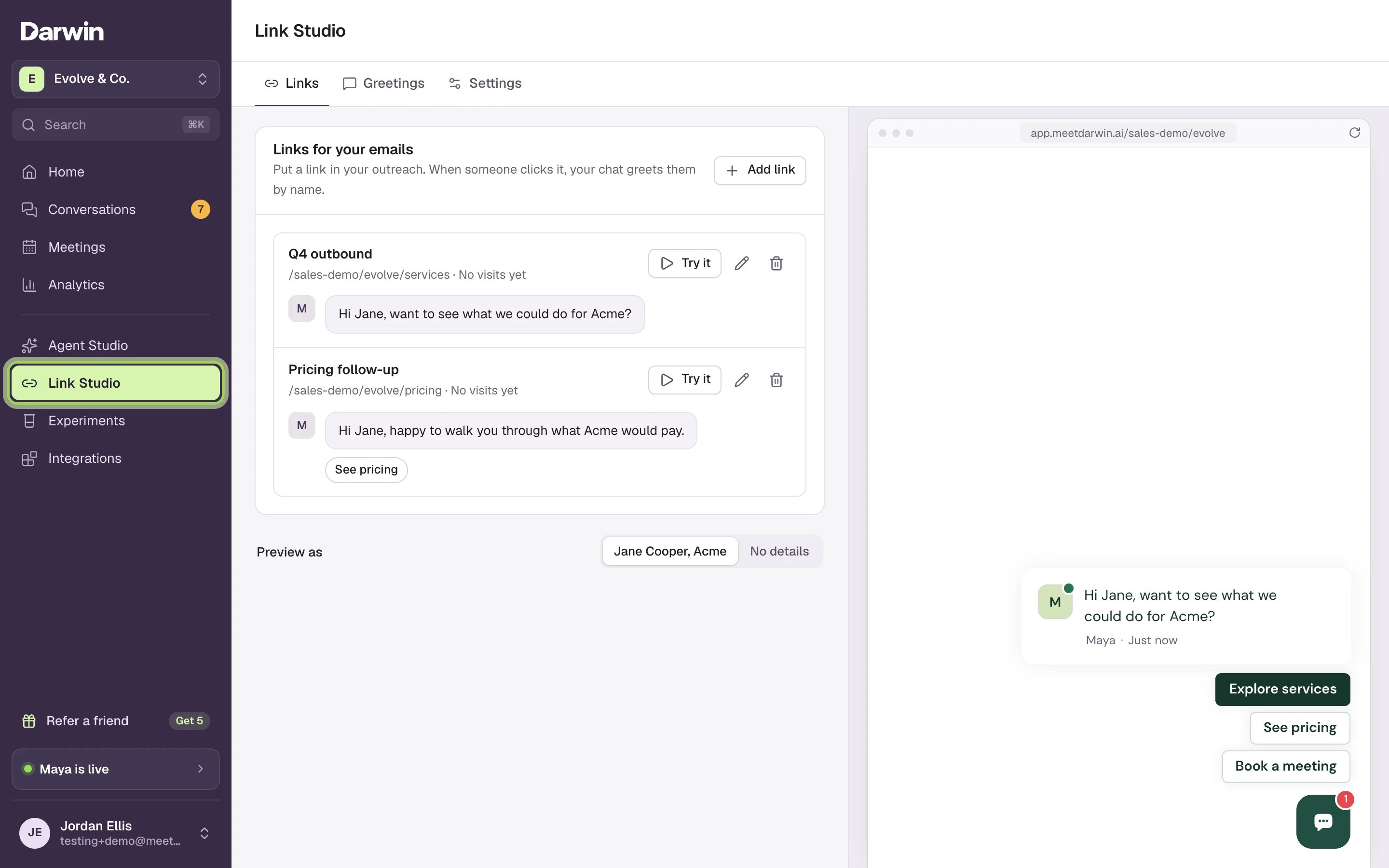
A personal link is a link to your website that you put in your outbound emails. When someone clicks it, the chat on your website opens with a greeting written for them, like "Hi Jane, want to see what we could do for Acme?", with the reply buttons you chose. The agent already knows who they are and why you reached out.
You make them in **Link Studio**, in the sidebar under Agent Studio. It has three tabs: **Links**, **Greetings** and **Settings**. The chat preview on the right shows what visitors will see.
 ## What happens when someone clicks
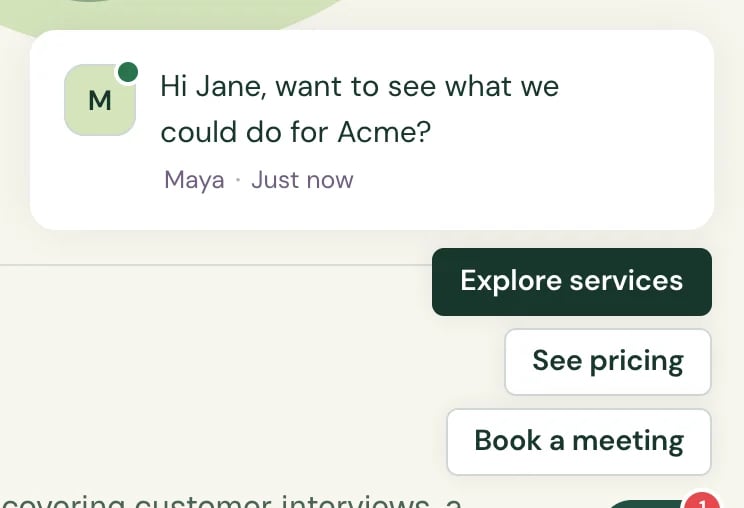 * **The greeting replaces your opening message.** It's filled in with their details, and the greeting's reply buttons replace your page's. It shows even on pages where you've hidden the opening message, and stays on the next pages they open in the same tab.
* **The agent knows who they are.** It knows the name, company and title the link carried, and what you wrote in **What the agent should know**, so it won't ask for their name or email again.
* **Booking is filled in.** If they book a meeting, the booking form already has their details.
* **They're saved as a contact.** If the link carries an email address, Darwin saves the person as a contact, or updates the one you have, like a form submission.
* **Your team hears about it.** An email such as "Jane Cooper from Acme opened your link" goes out once per person per link each day.
* **Your tracking stays.** Darwin removes only the link's own `dw` parameters from the address bar. UTM tags, your other parameters and `#anchors` stay.
## Links and greetings
Link Studio keeps two lists, one on each tab.
* **A link** is what you paste into an email. It has a name, the page it opens, a greeting, and its own ID, the `dw=` part of the address. Each link has its own results.
* **A greeting** is what the chat says to the person: the message, up to four reply buttons, and a note for the agent. One greeting can serve many links, and a change to it changes every link that uses it.
A link without a greeting is a **Draft**. It greets no one and can't be copied until you choose one.
## Set up your first link
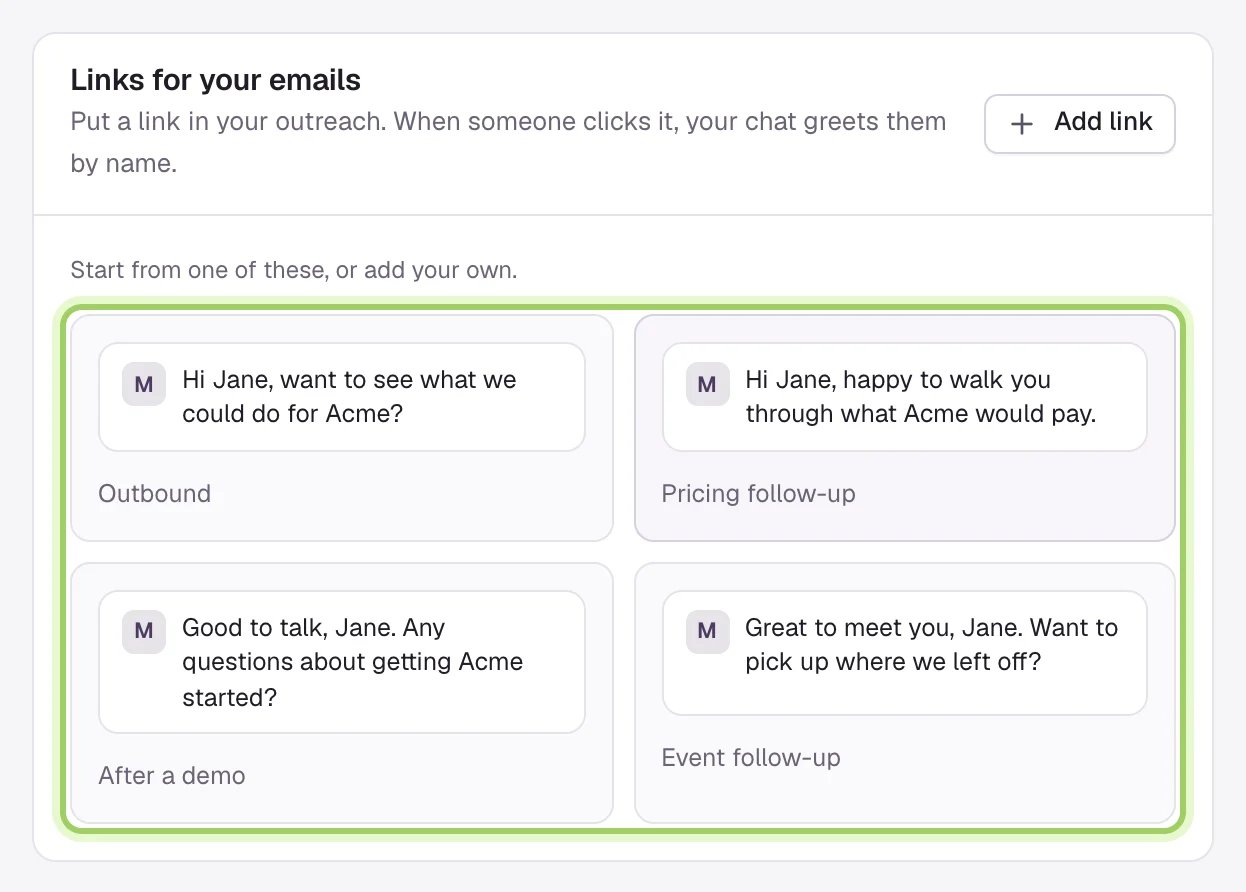
On the **Links** tab, select **Add link**. With no links yet, you can start from **Outbound**, **Pricing follow-up**, **After a demo** or **Event follow-up**, which come with a greeting. See [Make and share personal links](/link-studio/links).
* **The greeting replaces your opening message.** It's filled in with their details, and the greeting's reply buttons replace your page's. It shows even on pages where you've hidden the opening message, and stays on the next pages they open in the same tab.
* **The agent knows who they are.** It knows the name, company and title the link carried, and what you wrote in **What the agent should know**, so it won't ask for their name or email again.
* **Booking is filled in.** If they book a meeting, the booking form already has their details.
* **They're saved as a contact.** If the link carries an email address, Darwin saves the person as a contact, or updates the one you have, like a form submission.
* **Your team hears about it.** An email such as "Jane Cooper from Acme opened your link" goes out once per person per link each day.
* **Your tracking stays.** Darwin removes only the link's own `dw` parameters from the address bar. UTM tags, your other parameters and `#anchors` stay.
## Links and greetings
Link Studio keeps two lists, one on each tab.
* **A link** is what you paste into an email. It has a name, the page it opens, a greeting, and its own ID, the `dw=` part of the address. Each link has its own results.
* **A greeting** is what the chat says to the person: the message, up to four reply buttons, and a note for the agent. One greeting can serve many links, and a change to it changes every link that uses it.
A link without a greeting is a **Draft**. It greets no one and can't be copied until you choose one.
## Set up your first link
On the **Links** tab, select **Add link**. With no links yet, you can start from **Outbound**, **Pricing follow-up**, **After a demo** or **Event follow-up**, which come with a greeting. See [Make and share personal links](/link-studio/links).
 Choose a greeting you've written, or select **New greeting** to write one with names, reply buttons and a note for the agent. See [Write greetings](/link-studio/greetings).
Select **Save changes**, choose your email tool and select **Copy link**. Your email tool fills in each person's details when it sends.
Each link shows its visits, chats and meetings, and takes you to the conversations it started. See [Results and follow-up](/link-studio/results).
## Good to know
* Link Studio is on every plan.
* The chat must be installed on the page a link opens. See [Install the chat on your website](/installation/install-widget).
* **Greet people from personal links**, on the **Settings** tab, turns every greeting on or off. See [Settings and privacy](/link-studio/settings).
* Visits from personal links are left out of the page's [opening experiments](/optimization/how-it-works), so a greeting by name doesn't skew their results.
* Teammates with the Member role can see Link Studio but can't change it.
Add a link, give it a greeting and copy it into your email.
What the chat says, its buttons and what the agent knows.
This documentation is built and hosted on [Mintlify](https://mintlify.com), a developer documentation platform.
Choose a greeting you've written, or select **New greeting** to write one with names, reply buttons and a note for the agent. See [Write greetings](/link-studio/greetings).
Select **Save changes**, choose your email tool and select **Copy link**. Your email tool fills in each person's details when it sends.
Each link shows its visits, chats and meetings, and takes you to the conversations it started. See [Results and follow-up](/link-studio/results).
## Good to know
* Link Studio is on every plan.
* The chat must be installed on the page a link opens. See [Install the chat on your website](/installation/install-widget).
* **Greet people from personal links**, on the **Settings** tab, turns every greeting on or off. See [Settings and privacy](/link-studio/settings).
* Visits from personal links are left out of the page's [opening experiments](/optimization/how-it-works), so a greeting by name doesn't skew their results.
* Teammates with the Member role can see Link Studio but can't change it.
Add a link, give it a greeting and copy it into your email.
What the chat says, its buttons and what the agent knows.
This documentation is built and hosted on [Mintlify](https://mintlify.com), a developer documentation platform.