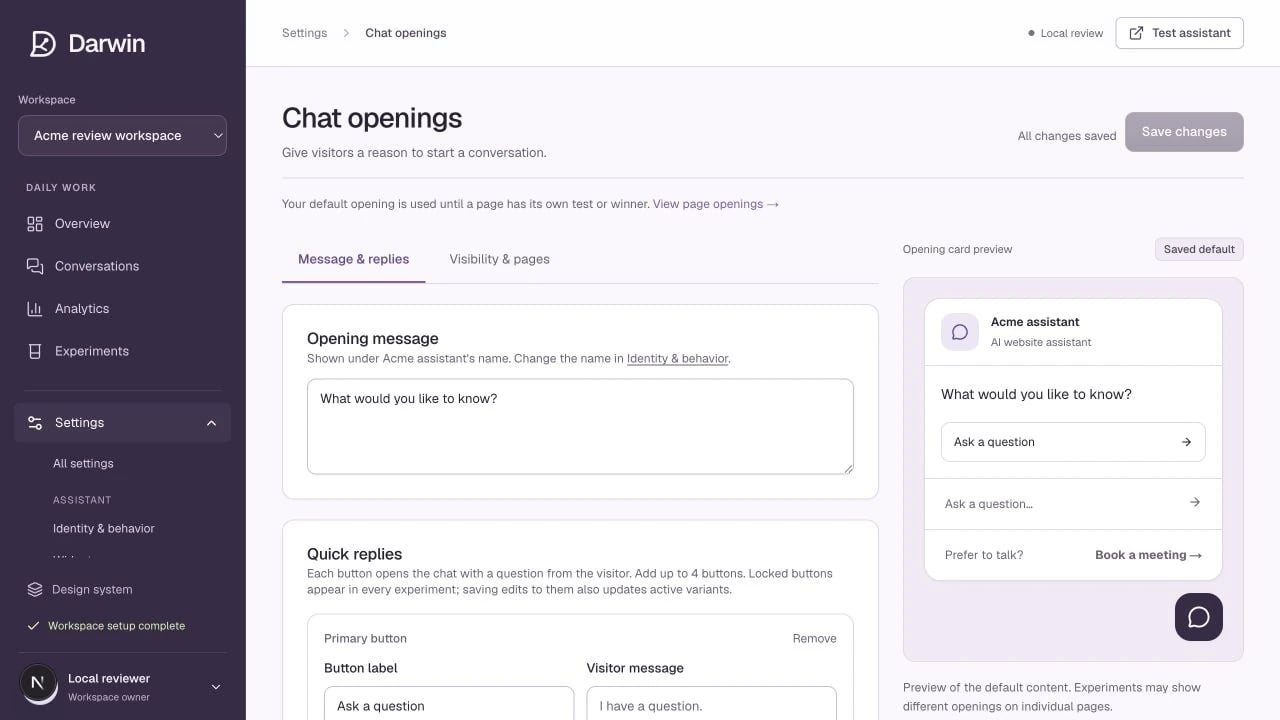
Screenshots use a demonstration workspace. Your data, plan, and activation status may differ.
The **opening** is the small message beside the launcher before a visitor starts a chat. It is the copy Darwin experiments with. Your default is used until a page has its own running test or winning opening. ## Message & replies Write a short opening that gives a visitor a reason to engage. “Need help finding the right plan?” offers more context than “Any questions?” For each reply button, set the **label** the visitor sees and the **message** sent when they click it. Use **Lock this button** for a reply that must remain consistent across variants. You can also show a question input so visitors can type directly into the opening card. The **Meeting link** area adds a persistent booking offer. Its lead-in is optional; leaving the link text empty hides it. The calendar destination lives in [Scheduling](/assistant/scheduling). ## Visibility & pages Turn **Show the opening card** on or off and set the desktop delay. On mobile, the card waits at least six seconds and until the visitor scrolls 40% down the page. A dismissed opening stays hidden for the rest of that session. Add page exclusions using an exact path, or a path ending in `/*` to cover a section. Check the preview and save your changes. Hiding the opening card is different from uninstalling the entire widget. ## If tests are already running Saving the default does not silently replace the copy in every active test. Darwin offers three choices: | Choice | Effect | | -------------------------- | ---------------------------------------------------------------------------------------------- | | **Test this new opening** | Adds your edit as a challenger while preserving the current comparison. | | **Replace test baselines** | Replaces active controls and restarts their evidence; the previous controls remain in history. | | **Keep current tests** | Leaves those experiments unchanged. | Use **Experiments → Pages** to see what is actually showing on a particular page.